

Imagine a massive 200cm × 200cm holographic canvas that displays live 4K content directly from your laptop, gaming console, or camera feed—with zero latency and no pre-rendering. That’s the power of a 2×2 HDMI 100cm holographic video wall. This guide walks you through the complete installation and testing process, from unboxing to real-time HDMI streaming. Whether you’re a systems integrator, event producer, or retail technologist, you’ll learn how to set up this stunning display for live events, digital signage, and interactive experiences.
Why Choose a 2×2 HDMI 100cm Holographic Video Wall?
Real-Time HDMI Live Streaming – Zero Latency
Unlike pre-loaded digital signage, each 100cm fan in the 2×2 array accepts direct HDMI input from PCs, media servers, gaming consoles (PS5/Xbox), or cameras. The sub-100ms latency ensures that live content—whether it’s a product launch, esports match, or concert feed—appears instantly and smoothly across all four units.
Seamless 200cm × 200cm 4K Canvas
Four 100cm fans are precisely synchronized using our zero-gap splicing technology, creating a single, uninterrupted display area of approximately 200cm (W) × 200cm (H). The combined resolution exceeds 4K, delivering grain‑free, ultra‑HD 3D visuals with no visible pixelation, even at close range.
Plug-and-Play Setup in Minutes
The tool‑free assembly and pre‑configured master controller allow you to go from unboxing to breathtaking 3D in under 20 minutes. No specialized technical skills required.
H3: Daylight‑Visible 2600 Nits Brightness
With 2600 nits of adjustable brightness, the video wall remains vivid and clear even under bright showroom lights or direct sunlight—making it suitable for storefront windows, outdoor events (with optional IP enclosure), and well‑lit exhibition halls.
Step-by-Step Installation Guide
What’s in the Box (2×2 Kit)
- 4 × 100cm HDMI holographic fans (100% aluminum alloy)
- 1 × master synchronization controller (HDMI input)
- 4 × wall/ceiling mounting brackets
- 1 × power distribution hub
- 1 × HDMI cable (1.5m)
- 4 × 8GB memory cards (pre‑loaded with test content)
- User manual & quick start guide
Mechanical Assembly
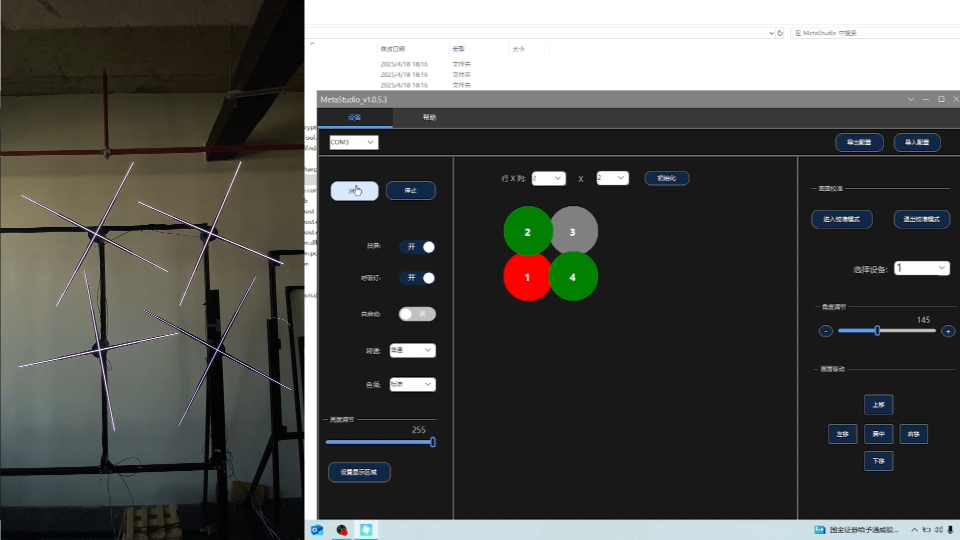
- Mount the brackets – Securely attach the four brackets to your wall or ceiling in a 2×2 grid pattern (200cm × 200cm spacing).
- Attach the fans – Click each 100cm fan onto its bracket using the tool‑free locking mechanism.
- Connect the sync cables – Use the included fiber‑optic cables to link each fan to the master controller, ensuring perfect frame‑level synchronization.
Electrical & HDMI Connections
- Power up – Connect the power hub to a 100‑240V AC outlet. The system consumes only 320W total (80W per fan).
- HDMI source – Plug your laptop, media player, or gaming console into the master controller’s HDMI input.
- Boot sequence – Turn on the master controller first, then the fans. The units will auto‑synchronize within 10 seconds.
Testing Your 2×2 HDMI Video Wall
Playback Test (Pre‑Loaded Content)
- Use the included SD cards or upload test videos (MP4 with black background recommended) to each fan’s memory.
- Verify that all four units display the same content in perfect sync.
- Check for any visible gaps, shadows, or color mismatches across the 2×2 array.
Real‑Time HDMI Streaming Test
- Connect a laptop to the master controller via HDMI.
- Open a full‑screen 4K video or live camera feed.
- Observe the video wall – the image should stretch seamlessly across the 200cm × 200cm canvas with no tearing or lag.
- Test switching between HDMI sources (e.g., laptop → PS5 → media player) to confirm instant recognition.
Brightness & Calibration
- Use the mobile app (iOS/Android) or cloud dashboard to adjust brightness uniformly across all four fans.
- Run a color‑bar test pattern to ensure consistent white balance and saturation.
Technical Specifications (2×2 HDMI 100cm System)
| Specification | Detail |
|---|---|
| Array Size | 2 columns × 2 rows |
| Total Fans | 4 units (100cm HDMI model) |
| Total Display Area | ~200 cm (W) × 200 cm (H) |
| Resolution per Fan | 3840 × 1536 pixels (4K UHD) |
| Total System Resolution | ~7680 × 3072 pixels (4K+ aggregated) |
| Pixel Pitch | P1.3 mm |
| LED Beads per Fan | 1,536 pcs (1010 RGB) |
| Brightness | 2600 Nits (adjustable) |
| Refresh Rate | 50 FPS |
| HDMI Input | HDMI 2.0 (4K downscaling supported) |
| Latency | <100 ms |
| Total Power | 320W |
| Material | 100% Aluminum Alloy |
| Control | Cloud, mobile app, HDMI direct, SD card |
| Mounting | Wall or ceiling (tool‑free brackets) |
| Compatibility | Windows, macOS, Android, PS5, Xbox Series X, media players |
Ideal Applications for a 2×2 HDMI 100cm Holographic Wall
- Large‑Scale Live Events & Concerts: Stream real‑time visuals, social media feeds, or stage graphics across a 2m square 3D canvas.
- Flagship Retail Stores: Create a monumental 200cm × 200cm display for product launches and immersive brand storytelling.
- Broadcast Studios: Use as a floating 3D background for news, weather, or talk shows.
- Gaming & Esports Arenas: Project PS5/Xbox gameplay onto the 2×2 wall for watch parties or tournament stages.
- Museum & Exhibition Centers: Display archival footage or 3D artifact scans at monumental scale.
- Corporate Headquarters: Welcome visitors with a synchronized brand story across four massive seamless panels.
Main Advantages of a 2×2 HDMI 100cm Holographic Wall
- True Real‑Time Interactivity: Update content instantly via HDMI – no pre‑rendering or file transfers.
- Seamless Splicing: Zero visible gaps or shadows between the four 100cm fans.
- Daylight‑Ready Brightness: 2600 nits ensures visibility in brightly lit environments.
- Low Power, High Impact: Consumes only 320W total – 80% less than comparably sized LED walls.
- Plug‑and‑Play Simplicity: Tool‑free assembly and auto‑synchronization get you running in minutes.
- Cost‑Effective: Delivers premium 4K 3D visuals at a fraction of the cost of custom LED video walls.
Custom Solution & Support for 2×2 Installations
We offer complete support for integrators and brands:
- Custom Content Creation: Our team can design 3D animations optimized for the 2×2 100cm format.
- OEM/ODM Services: Custom branding, housing colors, and input configurations.
- Software SDK: Integrate with existing CMS or broadcast systems (OBS, XSplit).
- Global Technical Support: 24/7 remote assistance and on‑site installation partners in 15+ countries.
- 3‑Year Warranty: Free parts replacement and firmware updates.
Product Details – What’s Included
The 2×2 HDMI 100cm holographic video wall kit is a complete turnkey system:
- Fans: 4 × 100cm ultra‑HD units (100% aluminum alloy, P1.3 pitch, 2600 nits, 3840×1536 resolution).
- Controller: 1 × master sync unit with HDMI 2.0 input.
- Mounting: 4 × tool‑free wall/ceiling brackets.
- Cables: Fiber‑optic sync cables and power distribution hub.
- Free bonuses: 10 premium 3D templates, content creation guide, 24/7 tech support.
Installation time: Approximately 20 minutes for a standard wall mount.
Frequently Asked Questions (FAQs)
Q1: Can I use the 2×2 wall with a gaming console?
A: Yes. Connect your PS5, Xbox Series X/S, or Switch to the master controller via HDMI. The 200cm × 200cm wall will project real‑time 3D gameplay across all four panels.
Q2: Is the 2×2 wall suitable for outdoor use?
A: The standard system is IP54 rated (dust/light rain resistant). For full outdoor exposure, we offer optional IP65‑rated enclosures for each 100cm fan.
Q3: How do I update content on the 2×2 wall?
A: You have three options: (1) direct HDMI input for live streaming, (2) cloud dashboard for remote updates, or (3) SD cards for offline playback.
Q4: Can I expand the 2×2 wall to a larger array later?
A: Absolutely. The modular design supports scaling up to 3×3, 4×3, or custom configurations without replacing existing 100cm fans.
Q5: What is the recommended viewing distance for a 2m × 2m display?
A: Optimal viewing is between 3 and 10 meters. The 2600 nits brightness ensures clarity at longer distances.
Q6: Does the 2×2 wall work with MacBooks?
A: Yes. Use a USB‑C to HDMI adapter (supports DisplayPort Alt Mode). The system is compatible with macOS, Windows, Android, and Linux.
👉Request 2×2 HDMI 100cm Holographic Fans→
Explore the Technology Behind the Show
quick shipping | 1-year warranty | Watproof enclosure included
📧 Email: kathy@iezway.com (For trade/volume discounts)
💬 WhatsApp: https://wa.me/8613715314066 (Instant tech support!)
WhatsApp VIP Line: +86 13715314066